
The final stage of my project was level design. While I had intended to make more levels than what was created, the gameplay system took a much more significant portion than planned. As the game’s core was about the interaction between the two players, I needed to prioritise this before the level design.
I first began by designing the HUB level. The purpose of this level is to ensure that the players are familiarised with the controls of the game before playing the level. I took inspiration from the initial HUB prototypes, but with help from feedback from peers, figured out that the initial prototype was too cramped for the players to fully get the hang of controls, and left no room to experiment with grab controls or throwing.
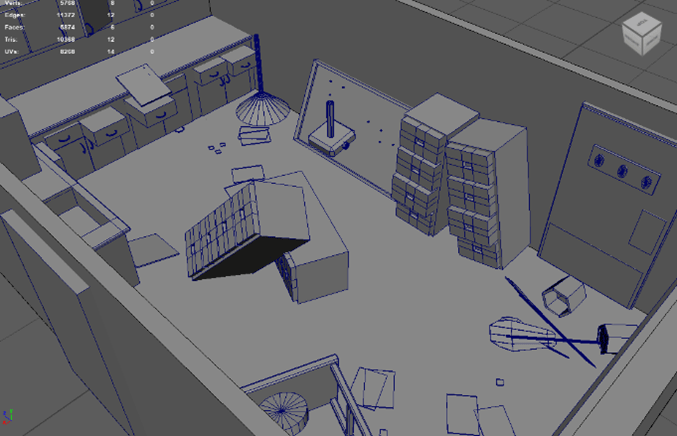

Two variants of the HUB prototype, created in DIT3000
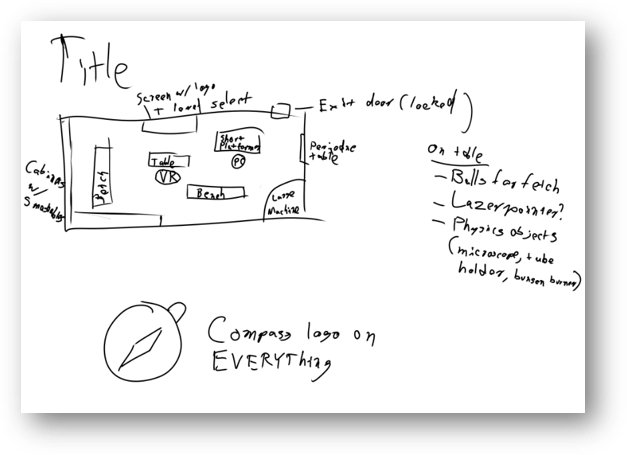
Sketch of the HUB level, created in DIT3000

Final HUB level, made in Unreal Engine 5.2
On the table, the players are met with tennis balls, which are bright green to contrast the rest of the room. The connotations with tennis balls is that they can be thrown, so the players immediately see it and are prompted to throw it, which results in a satisfying sound and a bounce. This leads the players to realise that grabbing and throwing is possible, leading to them looking at the rest of the table to see the glass, and attempt to throw that, leading to the glass smashing too. This, in turn, leads to the player being curious about what else there is to do, prompting them to look around for more things to interact with. Shelves are filled with glassware to smash, as well as a button to spawn more glass if the player presses it. This not only teaches the player that pressing buttons causes events to happen in the world, but also creates a fun interaction where glass can be spawned very quickly, leading to glass smashing other pieces of glass when spawning in. The glass spawner was added as a suggestion by a friend, enhancing the learning that happens in the initial hub room. Once the player hits start, they are transported to the tutorial level.
The design of the tutorial level was largely unchanged between pre-production and production. The level starts with each player locked in their own room. The VR player is locked behind a door, which requires a key hidden in the room to open, teaching them about doors and keys. This leads into a room with a large door and a button, which teaches that buttons can manipulate the world in more than one way. The PC player starts in a room with a closed door, with the only way out being a jump through a vent to teach the basic controls of a 3D platformer, where they meet up with the VR player. The next rooms involve using teamwork to open the door and discover mechanics, first by plugging SPUD’s tail into a socket, and then having SPUD hold a door open for ADOS while they grab a physics object to let SPUD through. The final room has a shelf that is too high for SPUD to jump to, and too far for ADOS to teleport to, so throwing SPUD is required to reach that shelf, further teaching the mechanics and the importance of teamwork. This shelf contains a key, which the VR player knows will unlock the locked door in front of them. Crafty players may also realise that with the help of the spare cardboard box, SPUD can jump up to the shelf, teaching players to look for multiple solutions and solve puzzles in creative ways.
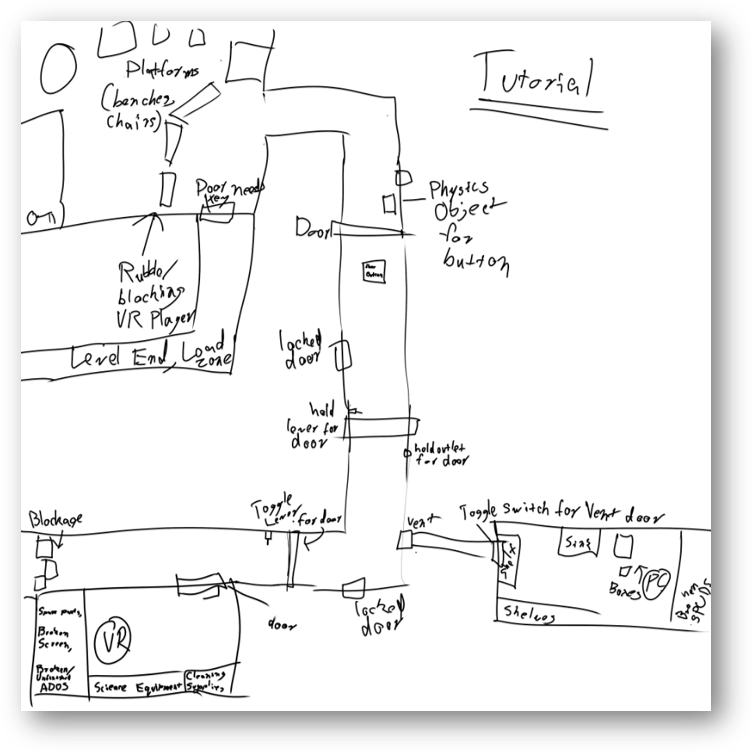
Initial Sketch of the Tutorial, done for DIT3000

Final room of tutorial
Level design was done with teaching the mechanics closely in mind, and was fine tuned with the help of testers, stating how certain mechanics were confusing or needed improving. For confusing mechanics, I tried to clear the areas where possible and added hints for especially confusing mechanics.
 Mitchell Eastment